Streaming AI messages
Render AI assistant replies token-by-token. Incoming chunks are batched with requestAnimationFrame (one render per frame, only the streaming bubble re-renders) and a blinking caret shows while a message is still streaming.
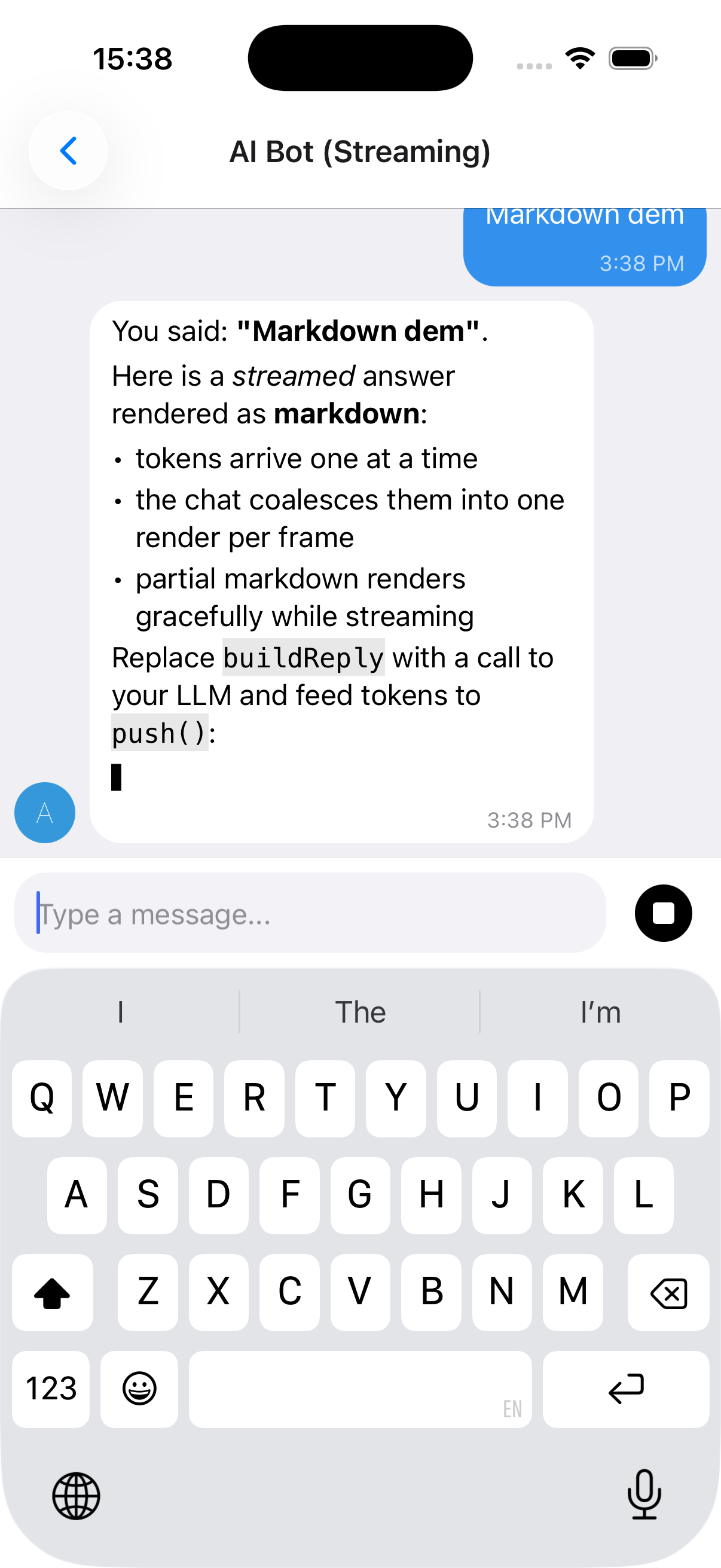
useStreamingMessages, stop control and a full example
The reply above streams in token-by-token (note the caret ▋) and renders as markdown - bold, italics, lists, inline and fenced code - while the app swaps the send button for a Stop control mid-stream (with renderSend, below). See Markdown rendering for AI replies to enable markdown.
IMessage.streaming- flag a message as streaming (shows the caret)useStreamingMessages(...)- owns the message list, rAF-batchespush(), and supports stop viaAbortController. It returns{ messages, setMessages, append, startStream, isStreaming, stop };setMessagesis there for anything the hook does not cover, so you can patch a message with a plainmap.
import { useCallback } from 'react'
import { Chat, IMessage, Send, SendProps, useStreamingMessages } from '@kesha-antonov/react-native-chat'

function Bot () {
  const { messages, append, startStream, isStreaming, stop } = useStreamingMessages<IMessage>()

  const onSend = useCallback((newMessages: IMessage[] = []) => {
    append(newMessages[0])                      // show the user's message
    const stream = startStream({ user: { _id: 2, name: 'Assistant' } }) // empty streaming bubble

    runMyModel(newMessages[0].text, {
      signal: stream.signal,                    // aborts when stop() is called
      onToken: token => stream.push(token),     // batched, one render per frame
      onDone: () => stream.done(),              // clears the streaming flag
    })
  }, [append, startStream])

  // While a reply streams, the send button becomes a Stop button.
  const renderSend = useCallback(
    (sendProps: SendProps<IMessage>) =>
      isStreaming ? <MyStopButton onPress={stop} /> : <Send {...sendProps} />,
    [isStreaming, stop]
  )

  return <Chat messages={messages} onSend={onSend} user={{ _id: 1 }} renderSend={renderSend} />
}
See docs/STREAMING.md for the full hook API and a real Claude streaming adapter (via a backend proxy). A runnable demo lives in example/components/chat-examples/AIBotExample.tsx.
Markdown rendering for AI replies
Built-in renderer, or react-native-streamdown
AI/LLM replies are usually markdown (bold, lists, fenced code). Enable markdown with messageTextProps={{ markdown: true }} (streamed messages auto-render as markdown unless you pass markdown={false}):
// Force markdown for every message:
<Chat messageTextProps={{ markdown: true }} {...props} />

// Streamed messages auto-render as markdown; disable with markdown: false.
There are two renderers and you get the best available one automatically:
-
Built-in, zero-dependency renderer (default). Covers headings, bullet/ordered lists, blockquotes, fenced + inline code, bold/italic/strikethrough, and links. It handles streaming-incomplete markdown gracefully (a half-written
**boldor an unclosed code fence renders as plain text until complete), so it's safe to feed token-by-token. Nothing to install. Exposed asBasicMarkdownif you want to use it directly. -
react-native-streamdown(optional upgrade). When installed it's used instead, for richer streaming-safe markdown (tables, partial-table handling, etc.). It is a native module with its own peers - install the full set:npx expo install react-native-streamdown react-native-enriched-markdown remend katexIt also requires
react-native-worklets >= 0.8.3(i.e.react-native-reanimated >= 4.3), andreact-native-enriched-markdownis a native module, so a dev build / prebuild is required (it does not work in Expo Go). 0.3 processes the markdown on a worklet runtime, which needs react-native-worklets' Bundle Mode: passbundleMode: trueandimportForwarding: { moduleNames: ['remend'] }toreact-native-worklets/plugininbabel.config.js, and wrapmetro.config.jsingetBundleModeMetroConfigfromreact-native-worklets/bundleMode(the example app does both). Until Bundle Mode is on, the chat keeps the built-in renderer and logs a one-time dev hint, since 0.3 throws on its first render without it. Version 0.3+ (StreamdownText) and the olderStreamdownexport are both recognised. The bubble's text color, size and link color are mapped onto itsmarkdownStyle, so replies match the chat theme in light and dark. Anything inmarkdownPropsis forwarded toStreamdownText; amarkdownStylethere is merged per element over the derived one:<ChatmessageTextProps={{markdown: true,markdownProps: { markdownStyle: { codeBlock: { backgroundColor: '#0d1117' } } },}}{...props}/>